
Follow ZDNET: Add us as a preferred source on Google.
ZDNET's key takeaways
- You can ask Google to remove your passport and other IDs from its results.
- You'll first have to share the personal details with Google.
- You can also request the removal of explicit images of yourself.
You've long been able to ask Google to remove certain personal information from its search results, such as your name, home address, phone number, and email address. But now the search giant has expanded the types of details it will delete in response to your request.
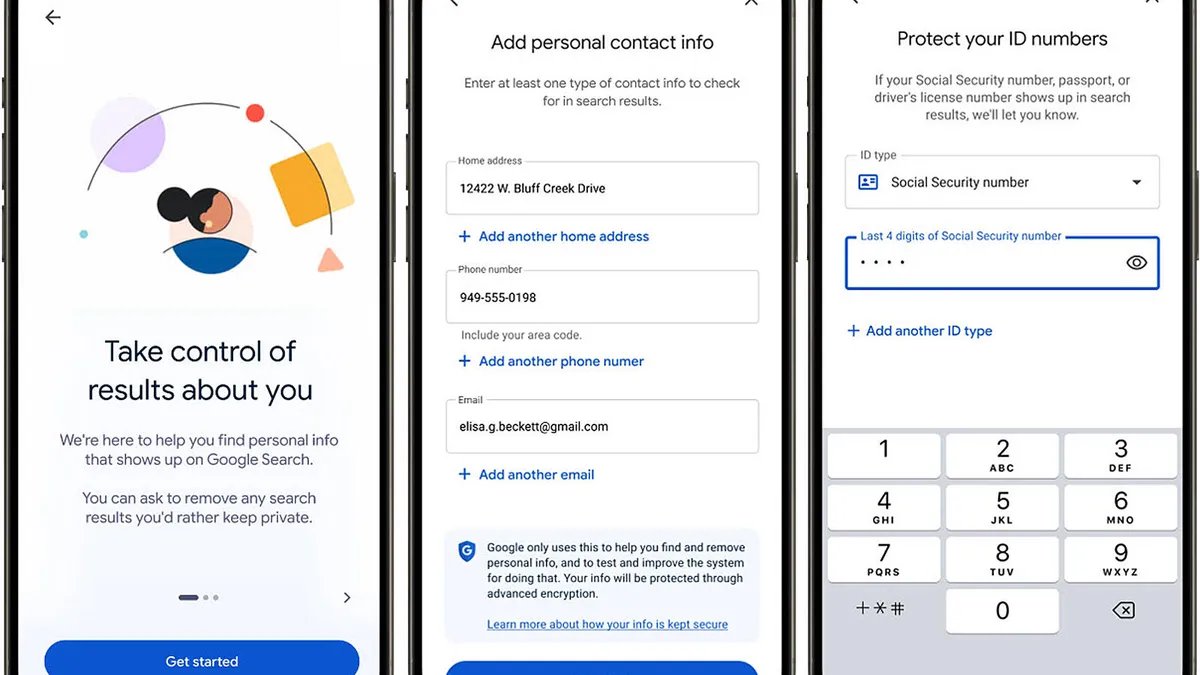
First up, you'll soon be able to give the heave-ho to any of your government-issued IDs that pop up in a search result. That includes your passport, driver's license, and Social Security number. Right now, this option is just rolling out in the US and should hit other countries down the road. But once it reaches your account, here's how it will work.
How to get started
On the web, head to the Results about you hub. In the Google app, select your account photo, then tap “Results about you.” If you've never requested the removal of personal info before, select the Get Started button. You'll be asked to add your contact details, including your name, home address, phone number, and email address. If you've used this before, select the gear icon at the top to modify any information you've already added.
Also: Is Google saving your voice recordings? How to check, delete, and opt out – fast
With the new option for government-issued IDs, you'll be prompted to add your passport, driver's license, and Social Security number, depending on which you want monitored and removed.
Google will scour its search results for the details you added. You'll then receive an email notification if any of them pop up, allowing you to take the necessary action to request their removal. You'll also see the status of your request on the same page or screen where you can select a specific request to learn more about it.
Keep in mind that your request doesn't delete the information from the web entirely. But removing it from Google's search results is a significant step, as many people could find it that way.
How safe is it?
Sounds like a quick and easy way to ensure sensitive details don't appear in search results for anyone to see. Ah, but there is a catch. For this to work, you have to share the information with Google in the first place. That means entering your passport, driver's license, or Social Security number on the removal request page. Is that safe?
Also: 10 ways AI can inflict unprecedented damage in 2026
Google promises that your personal information is secured with advanced encryption and access controls to ensure it remains private. The company also pledges not to share your details or use them to personalize other Google products. In the case of your Social Security number, you're not sharing the entire number but only the last four digits.
Still, you're giving Google the benefit of the doubt that it will fully protect your private information.
“Any request to share information like a passport number or Social Security number should be approached with caution,” Shane Barney, chief information security officer for Keeper Security, told ZDNET.
“Google has the technical capability to encrypt and protect that data, and there's no indication this specific process is inherently insecure. However, from a security standpoint, the concern isn't only about how well the data is protected today. It's that sharing highly sensitive identifiers with any third party increases the number of places where that data exists, which inherently increases risk over time.”
Also: Your default home Wi-Fi setup isn't nearly as private as it should be – 6 free ways to improve it
In this case, you want to weigh the pros and cons. If you are concerned that certain confidential details have been leaked online, then sharing that information with Google for removal could be the lesser of two evils. If not, then you'd want to think twice about sharing those details at all.
“If a government ID number is already exposed online and appearing in search results, requesting removal can reduce the likelihood of identity theft, fraud, or impersonation,” Barney said. “In those cases, using a removal tool may be a reasonable step to limit further exposure. If there's no indication that information is already publicly exposed, there's little upside to proactively submitting it.”
Explicit images, too
Further, you can always remove the personal data after your request has been granted. To do that, head back to the request screen or page, click the gear icon, and then select the option to remove all personal info.
Next up, you can also ask Google to remove any compromising pictures of you, aka non-consensual explicit images. For this one, let's say a compromising image of you pops up in a search result. Click the three dots next to the image, select “Remove result,” and then choose the option for “It shows a sexual image of me.” You can even select multiple images to request that they all be removed.
Also: I found a free Google Maps alternative that doesn't track my location (or kill my phone battery)
Click the Get Started button, and you'll be asked a few questions to fine-tune your request. If your wish is granted, the image will then be removed from Google's search results. Plus, this new option will let you opt in to protections that block other explicit results from appearing in similar searches.
This one is rolling out in most countries over the next few days and will expand to more regions in the near future.